Introduction to How the Wii Works

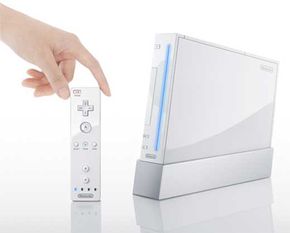
Nintendo Wii console and controller
Photo courtesy Nintendo of America, Inc.
Nintendo Wii console and controller. See more Nintendo Wii pictures.
Imagine that you are one of the major video game console manufacturers in the world. Everyone in the industry is selling approximately the same thing -- a console containing the processor along with a two-handed game controller. If you are in last place, what are you going to do to stand out?

One way to create a splash would be to totally blow out the amount of processor and graphics firepower. The problem is that both the Xbox 360 and the PlayStation 3 have already staked out the high ground here. They have bleeding-edge multicore chips.

So Nintendo took a different and far riskier path. Initially, it chose the codename "Revolution" for its new game console. Then, the "Revolution" gave way to a full-scale world war. At least that's what we thought when we saw the new name, "Wii," which sort of triggers a mental image of WWII. But that's not what the name is meant to represent at all. In fact, according to the folks at Nintendo, the code name "Revolution" indicated the direction of where Nintendo was headed with the new console. Now, the name "Wii" indicates the final answer. Nintendo has also expressed that the pronunciation of Wii, which is like the English word "we," tells you who this console is for -- all of us, everyone! There are other implied or attached meanings in the new name -- one important one goes with related Wi-Fi releases to be used with Nintendo's wireless gaming service, "Nintendo Wi-Fi Connection."

Naming aside, the company set a big goal -- to dramatically improve the interface for video games. With this strategy, Nintendo built an amazing amount of hype around its innovative controller for the Wii.

In this article, we'll take a close look at Nintendo's new console and interface. We'll also learn what makes the Wii so incredibly different from other next-generation consoles.

Video Gallery: Nintendo Wii

In March 2007, the Nintendo Wii launched in Europe to rave reviews. See how the exciting new game system works in this video from Reuters.

Watch this Neo-Fight video review of the Nintendo Wii and Sennheiser headphones.

Research shows that surgeons who play video games perform certain surgeries more accurately and quickly than non-video-game-playing surgeons. Learn about video games' effect on surgeons in this video from ScienCentral. 

The Wii's Interface

Nintendo GameCube controller
Photo courtesy Nintendo of America, Inc.
Nintendo GameCube controller
If you look at the controllers for the Xbox, the Playstation 2 and the GameCube, you'll notice that they are nearly identical. You hold them in two hands and use your thumbs to control the in-game action with buttons, D-pads and joysticks. Your index fingers pull triggers that shoot guns and perform other functions. The controllers for the upcoming Xbox 360 and Playstation 3 consoles appear to offer more of the same.

There are two ways to look at the similarity between these controllers. Are they are identical because the design has been honed to perfection and there is no room for improvement? That is what happened, for example, with the car steering wheel. All cars have steering wheels, and they have all had steering wheels for nearly a century.

The other approach is think about controllers in a completely different way -- a way that can revolutionize gameplay.

Nintendo took the latter approach: Its designers got outside of the box and innovated. When you first see the new Wii controller, it appears a little ridiculous. It looks like the remote control for a TV and it has no joystick. But the initial reviews have been good, and it actually makes sense once you understand the design principles.

Gyroscopes to the Rescue
The key to Nintendo's new game interface lies inside the controller. Instead of using a joystick to control the game, the primary control is the controller itself. The controller contains solid-state accelerometers and gyroscopes that let it sense:

  • Tilting and rotation up and down
  • Tilting and rotation left and right
  • Rotation along the main axis (as with a screwdriver)
  • Acceleration up and down
  • Acceleration left and right
  • Acceleration toward the screen and away
The surprising thing is that you can create an accurate and natural user interface this way.

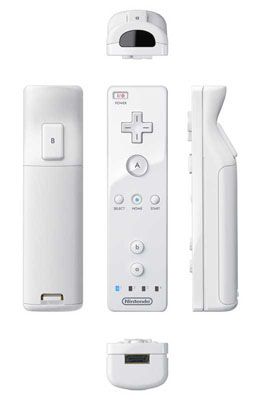
Nintendo Wii controller angles
Photo courtesy Nintendo of America, Inc.
The controller from all angles

Prior to its release, Nintendo had several demos that let people experience the new controller. In one demo players shot at an object on the screen. You simply pointed the controller at the target and fired. It is completely natural. In another demo you flew an airplane. You simply moved the controller in the way you wanted the plane to move, and the plane on the screen moved. It is easy to do sharp turns, barrel rolls and loops.

In other demos the controller acted like a stick. The controller manipulated an on-screen fishing pole, an on-screen drum stick or an on-screen fly swatter.

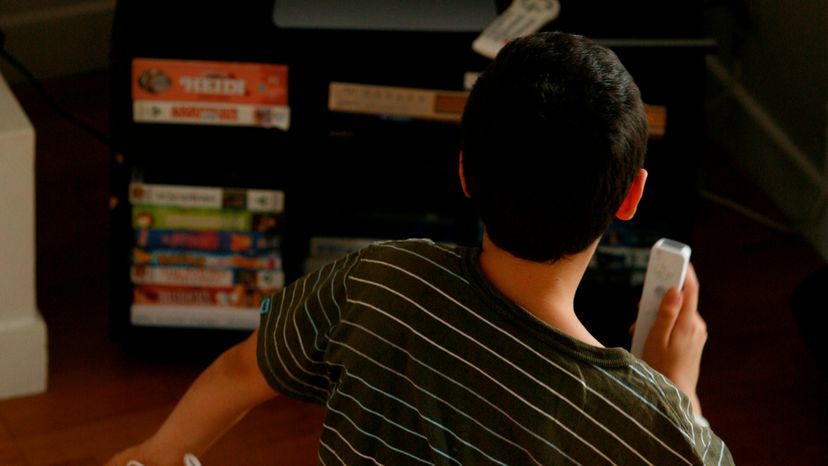
The Wii controller in action
Photo courtesy
Nintendo of America, Inc.

The Wii controller in action
There are several advantages to this approach:

  1. Controller use seems to be completely intuitive, meaning that anyone can use it almost immediately -- there's no learning curve or fumbling as with joysticks.
  2. The controller is very fast. You can move from one side of the screen to the other with a quick flick of the wrist.
  3. The controller is very accurate: Things respond exactly as you expect.
  4. The controller lends itself naturally to new game-playing paradigms. Playing a sword-fighting or fishing game with a joystick is clunky. Playing it with a controller that can be swung like a sword or a fishing pole is completely natural.
  5. Playing an active game like tennis, boxing or baseball with the Wii can even give you a cardio workout -- a bonus for those who'd rather play video games than hit the gym [ref].

In the next section we'll discuss some variations on this controller and see how the console is powered.

Official Wii Specs
­The Wii released in the United States on Nov. 19, 2006, with a Manufacturer's Suggested Retail Price of $249.

Here are a few highlights:

  • The Wii is about 8.5 inches long, 6 inches wide and less than 2 inches thick.
  • The Wii's Optical Disc Drive (ODD) supports single- and dual-layer Wii discs as well as GameCube discs. The maximum read speed is the equivalent of six times that of a DVD drive.
  • The Wii console communicates with the Internet even when the power is turned off. Users connect wirelessly using IEEE 802.11 or a USB 2.0 LAN adaptor. Users can also connect wirelessly using the Nintendo DS.
  • The controller is battery-powered and functions as a remote for the Wii. It includes the Direct Pointing Device with a three-axis accelerometer, indicator LEDs and rumble (which can be adjusted for intensity and turned off).
  • The controller can be used by itself, with a Nunchuk extension and with a classic controller. Nintendo plans to release more extensions, and you can use the GameCube's bongos for "Donkey Kong" in either Wii or GameCube mode.

For more information about the Wii, visit the official site.      


Wii Controller Variations

The system is not quite as pure as the previous description would lead you to believe. First of all, the gyroscopes alone do not provide the accuracy needed to play certain games. A sensor, or "control strip" must be placed on the user's television to monitor the position of the controller. Secondly, in many games you need the ability to aim and control more than one thing at a time. For example, in any first-person-shooter game, you will want to shoot while running. This means that you must be able to aim the gun and simultaneously move your character. The Nintendo Wii system has two ways to handle this problem.

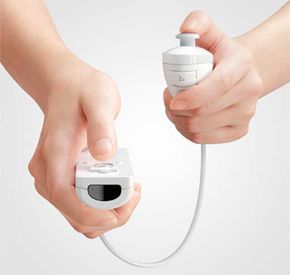
A Nunchuk analog unit is attached to the Wii controller.
Photo courtesy Nintendo of America, Inc.
Here, a Nunchuk analog unit is attached to the controller. Thanks to an on-board accelerometer, the Nunchuk is also motion sensitive.

The preferred way is to attach a separate joystick pod, or Nunchuk, to the controller. You hold the controller in one hand and the joystick in the other. In a first-person shooter game, the controller controls the gun and the joystick controls the running. The second possibility is to add a standard game controller. Speaking of standards, to get the most enjoyment from playing classic games using the Wii's virtual console, Nintendo will be releasing the "Wii Classic Controller," which feels similar to the old SNES game controller. These add-ons attach to the controller using a special socket built into the butt of the controller.

Speaking of attaching stuff -- thanks to Bluetooth technology, the Wii will be able to handle up to four remotes at once. And don't worry that it will get cramped with four folks hovering near the console. That's not necessary. Thanks to the Sensor Bar, as long as a remote is within a 30-foot range of the Wii console, there should be no problem with the wireless signal.

Powering the Wii
To power the Wii, Nintendo has taken an interesting approach. Nintendo has focused on building a console that is "more power-efficient, quieter and faster to start" [Source: IGN].

According to an article on the IGN Web site, Wii runs "on an extension of the Gekko and Flipper architectures that powered GameCube." The "Broadway", Wii's CPU, which is made by IBM, packs 729MHz of power. Wii has 24MB of "main" 1T-SRAM on board and an additional 64MB of "external" 1T-SRAM -- for a grand total of 88MB of RAM [source: IGN].

Wii and the News

Woman Dies in Wii Contest
The Wii made the news in a sad way in January 2007. A 28-year-old woman named Jennifer Strange died of water intoxication after competing in a radio station contest where contestants drank massive amounts of water in an attempt to win a Wii. For more information, see How can someone die from drinking too much water?

The Wii has had no shortage of publicity since its release -- some good, and some bad. First there was the competition with Sony's PlayStation 3, which was released at about the same time, to see which console would dominate the 2006 holiday season (winner: the Wii). Then, Nintendo issued a recall of the original Wii controller straps after several reported incidents in which gamers lost control of the remote and sent it flying across the room, sometimes causing damage to TVs or windows. Wii consoles that were shipped starting in December 2006 have a sturdier version of the strap. Nintendo also lists safety recommendations for Wii users on its official site.

Not content to simply make news headlines, the Wii also brings the news directly to you. On Jan. 27, 2007, the Wii launched its News Channel. A free feature for Wii owners, the News Channel brings stories from the Associated Press wire services to your TV screen via the Wii remote. According to a Yahoo! press release, you simply point the remote at a virtual globe and select the location and type of news (Business, Sports, Science and so forth) you're interested in to see frequently updated news stories from around the world.

Nintendo Wii with Remote
Photo courtesy Nintendo of America, Inc.
The Wii remote can be used to access Associated Press news from around the world.

GameCube vs. Wii

The Nintendo GameCube was released in September 2001. The Wii came out about five years later. It is interesting to compare the two systems and see just how much can change in five years:

Nintendo GameCube
Nintendo of America, Inc.

  • The GameCube has a single-threaded PowerPC processor running at 485 MHZ. The Wii's processor, running at 729MHz, is faster.
  • The GameCube has 24 MB of RAM. The Wii has 88 MB of RAM.
  • The video card in the GameCube has 16 MB of video RAM, while the Wii has 88 MB.
In 2007, Nintendo introduced more exciting features and accessories for the Wii. Read on to find out all about them.

Super Cool Wii Feature
The Wii is the master of backwards capability. Don't worry about pining for your old favorites -- the Wii works with your old GameCube discs and memory cards. And, for even older systems like the SNES and Nintendo 64, the Wii features a Virtual Console that downloads older games for playing on the Wii.

Wii Fit

According to a federal report funded by the Robert Wood Johnson Foundation, one-third of American children are either obese or at risk of becoming obese. Many people blame television and video games for the increase in childhood obesity, claiming that kids today just don't get enough exercise. Nintendo's Shigeru Miyamoto found a way to get kids exercising while enjoying one of their favorite activities -- playing video games. In 2006, Nintendo revealed an exercise game known as Wii Health Pack, which has since been renamed Wii Fit. Wii Fit includes more than 40 different activities that are designed to keep players active and healthy while entertaining them at the same time. The activities focus on four different aspects of exercising: aerobics, muscle conditioning, yoga and balance. 

wii players
Patrick Lin/AFP/Getty Images
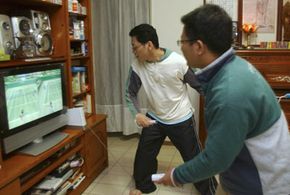
Two men in Taiwan test out the Wii in March 2007.

Wii Fit comes with the Wii Balance Board, which is a wireless board that senses small shifts in posture and weight placement so that your Mii, or onscreen character, mimics your movements exactly. The Balance Board, which resembles a small bathroom scale, has gyroscopic technology and multiple sensors built into it. The gyroscopic technology measures shifts in weight based on the conservation of angular momentum. Angular momentum measures the extent to which an object rotating around a reference point will continue to do so until acted upon by some outside force. The multiple sensors measure a user's body mass index and center of gravity. The Wii Balance Board goes beyond simply calculating your body mass index; it also tracks your overall progress in terms of your fitness age. A person's Wii fitness age is calculated by factoring his or her body mass index, performance during balance tests and overall center of gravity. By tracking your progress, Wii Fit makes it more fun to play. Users want to be as fit as possible in the eyes of the game so that, like in any other video game, they can claim to be the best. It is also designed to inspire players into setting personal goals, which help them stick to their Wii Fit exercise routines.  

Wii Fit combines traditional exercises such as press-ups (push-ups), yoga, stretching and step aerobics with exercises designed to entertain, such as hula hooping, ski jumping and heading soccer balls. For now, the Wii Balance Board works only with Wii Fit, but software developers are excited by the opportunities presented by this new gaming technology. Gamers are hoping that skateboarding and snowboarding games, along with potentially many others, will utilize the Balance Board to create more of a virtual reality gaming experience.

Wii Internet

paris wii line
Jack Guez/AFP/Getty Images
People wait in front of a store in
Paris for the Wii to go on sale
in December 2006.

Online gaming is a market that no video game company wants to miss, and Nintendo is no exception. With that in mind, Nintendo not only designed the Wii to let players compete against each other online, but it also added an entirely different aspect of the Internet to its newest system-browsing. Once the Wii has been hooked up to the Internet, either wirelessly or with an Ethernet cable, you can purchase Wii Internet for $5. The full version of the Internet Channel, which is a version of the Opera 9 Web browser, was launched in April of 2007 and it allows Wii owners to surf the Web in a unique fashion. The font is much larger than it is on a computer, so it is a lot easier to see from the comfort of your couch. You can also zoom in and out and scroll up, down and sideways using the Wii remote.

 The Wii Internet Channel takes only a few seconds to launch, mostly because it stays connected to the Internet even when it is powered off. The software is saved on the 512 MB Wii internal flash memory. The software can also be transferred to an SD card after you download it, although temporary Internet files will remain on the internal memory. The Opera-based browser can support a host of Web 2.0 technologies and applications including: 

  • CSS
  • JavaScript
  • Ajax
  • RSS
  • Adobe Flash 7
  • Widgets  

The biggest gripe about the Wii Internet Channel is that the browser does not support Adobe Flash 8 or 9. According to Opera, the reason that the browser does not support the later versions of Flash is that a software development kit is not yet available for either version. Because Opera utilizes an older version of Flash, problems may arise while you are trying to view certain Flash videos. Aside from the problems on the user's side, Nintendo is also having a bit of trouble with the Wii Internet Channel. Apparently, hackers have found a loophole in the system that allows them to run their own code on the Wii console. The loophole is in the Flash Player embedded within the browser and could allow hackers to create video game emulators. That sounds like a great loophole, right? Not if you're Nintendo. One of their potential moneymakers is the Virtual Console, which charges gamers between $5 and $10 for unlimited access to a retro title. 

The Wii can use an Internet connection in more ways than just browsing. There are also free applications such as Wii's News and Forecast Channels. The News Channel provides you with a view of the globe, which allows you to view news by region if you wish. The Forecast Channel also gives you a view of the globe, but this view also shows current weather systems around the world. If you zoom out far enough, you can see an accurate star map in the background. Since you register your Wii's locations, it also knows what you're looking for in the way of a local forecast.

Wii Accessories

The Nintendo Wii, like every other video game console, has some controller variations and other accessories available for serious gamers. Some of the accessories are very useful, while others merely add to the aesthetic value. Some examples of Wii accessories that fall into the "looks good, but not very useful" category are the plastic attachments for the Wii remote that make it look like a tennis racket, golf club or baseball bat. Nothing about the Wii or the game you're playing changes -- the attachments just transform your Wii remote into a prop. There are also boxing gloves that can house the Wii remote and Nunchuck. Just like the plastic attachments, these gloves don't change anything about the game, except for the fact that you don't actually have to hold onto the controllers.

games convention 24
Carsten Koall/Getty Images
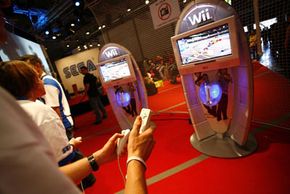
The Wii was featured at Games Convention 24 in
Leipzig, Gemany, in August 2007.

However, there are many worthwhile Wii accessories that could definitely increase your gaming enjoyment. The Wii Zapper is a plastic device resembling a tommy gun that houses both the Wii remote and Nunchuck. It's designed to be used with first-person shooter games, and its two-handed design allows for more stability and better aiming. The Nunchuck fits into the back handle of the gun, and you use the joystick on the Nunchuck to move your character. There is a spring-loaded trigger on the Zapper that is connected to the B button on the back of the Wii Remote. You simply point the gun where you want to aim and fire when ready. The only downside of the design is that it limits players to the use of three buttons: the trigger and the C and V buttons on the Nunchuck.

The Wii Wheel is another useful accessory that is being shipped with Mario Kart Wii. It is a small plastic steering wheel that houses the Wii Remote within its circumference. According to Nintendo, the Wii Wheel will even the playing field so that novice gamers can race bumper-to-bumper with seasoned Mario Kart veterans. Ubisoft, the video-game developer and publisher, also came out with a steering wheel accessory to ship with GT Pro Series and Monster 4x4 World Circuit. Ubisoft's version is similar to Nintendo's in the sense that they are both simply steering wheel shells that house the Wii remote.

Aside from the useful accessories that are designed to improve the quality of gaming, there are also some accessories that improve the overall performance of the Wii. You can buy a component video adapter, which will improve the graphic quality on your television from 480i to 480p. The component video standard utilizes three connectors called Y, Pb and Pr. The Y-connector transmits the video information, which is the black-and-white image, and the Pb and Pr connectors transmit the color information. In order for the component video adapter to work properly, you must go into the Wii System menu and set it to 480p. Once you have set your Wii to 480p, also known as progressive scan, it will recognize when games are progressive scan-compatible and automatically default to that setting.

Another accessory that improves the performance of the Wii is the Wii remote charging dock. The Wii remote burns through standard alkaline batteries very quickly, and once it begins to get low on power, the remote is less responsive. For example, a Wii remote that's low on batteries is less likely to register a thunderous right hook that you throw at your boxing opponent -- so the game just isn't as much fun. These charging docks, which contain rechargeable lithium battery packs, are produced by a variety of different companies. Some docks can accommodate four Wii remotes, others just one. Some docks have places to set your Nunchucks, others do not. It's difficult to guarantee the quality of any of the charging docks since they're not manufactured by Nintendo, but they will make your Wii life a lot simpler.

For more information about the Nintendo Wii and related topics, check out the links on the next page.

Lots More Information

Related HowStuffWorks Articles

More Great Links

Sources

  • Answers.com. http://www.answers.com/topic/wii-game?cat=
    technology&print=true
  • BBC News, "Nintendo Responds to Wii Breakages."
    BBC News, Dec. 15, 2006.
  • Block, Gerry. “Wii Zapper Hands On Impressions.” IGN, July 12, 2007. http://gear.ign.com/articles/804/804382p1.html
  • Brightman, James. “That’s ‘Exertainment.’” BusinessWeek, Feb. 15, 2007. http://www.businessweek.com/print/innovate/content/feb2007/
    id20070215_459927.htm
  • Casamassina, Matt. "Revolution's Horsepower: Studios give us the inside scoop on the clock rates for Broadway and Hollywood. How do the CPU and GPU stack up on paper?" IGN, March 29, 2006.
  • Casamassina, Matt. "Understanding the Revolution Controller." IGN, Sept. 16, 2005.
  • Casamassina, Matt. “E3 2007: Feet-on Wii Fit.” IGN, July 12, 2007. http://wii.ign.com/articles/804/804113p1.html
  • CNET News. "It's official--Wii use can cause weight loss." Jan. 20, 2007.
  • Demerjian, Charlie. "Revolution specs outed." The Inquirer, September 25, 2005.
  • Fisher, Ken. "Nintendo Revolution specs revealed?" ArsTechnica, Sept. 23, 2005.
  • http://nintendo.okayblog.net/wii-component-video-adapter.html
  • Lytle, J. Mark. “New Wii fitness game and board controller.” Tech.co.uk, July 12, 2007. http://www.tech.co.uk/home-entertainment/
    gaming/accessories/news/
    nintendo-wii-health-game-and-board-controller?articleid=1699375986
  • Mirabella, Fran and Matt Casamassina. "Hands-on the Revolution Controller." IGN, September 15, 2005.
  • Nintendo.com. http://www.nintendo.com/consumer/systems/wii/en_na/
    setupComponentHookup.jsp
  • Opera press release, Dec. 22, 2006. http://www.opera.com/pressreleases/en/2006/12/22/
  • Siracusa, John. "Inside the Revolution controller (maybe)." ArsTechnica FatBits, Sept. 26, 2005.
  • Siracusa, John. "You say you got a real solution." ArsTechnica FatBits, Sept. 16, 2005.
  • Torres, Gabriel. “Component Video.” Hardware Secrets. http://www.hardwaresecrets.com/article/88
  • West, Steve. “Balance Board Gets Gamers to Shape Up.” CB Tech, July 12, 2007. http://www.cinemablend.com/technology/E3-2007-Wii-Balance-Board-
    Gets-Gamers-To-Shape-Up-5248.html
  • Yahoo! Finance. "News at Your Fingertips: AP and Nintendo Launch Wii News Channel Across Americas.” Jan. 26, 2007.­