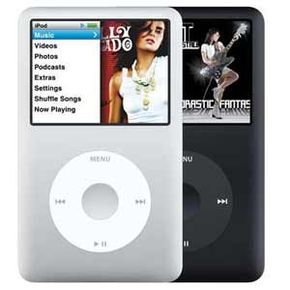
In 2001, Apple introduced the iPod, an MP3 player with the unheard-of storage capacity of 5 gigabytes. Six iPod generations later, the iPod plays songs, movies, games and photo slideshows, and you can store up to 160 GB of any type of file you want. The evolution has been a lesson in consumer electronics marketing and development: Millions of people are so hooked on the iPod, they continue to buy it and its coordinating Apple products despite quick battery death and difficult repairs.
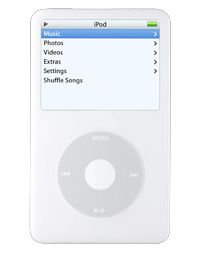
The 2007 iPod release, the sixth-generation iPod classic, is a digital audio player, video player, photo viewer and portable hard drive, making it a full-fledged portable media center. It's available in 80-GB and 160-GB capacities and has a color LCD screen. In addition to the iPod classic, there are several other devices in the current generation of iPod players:
Advertisement
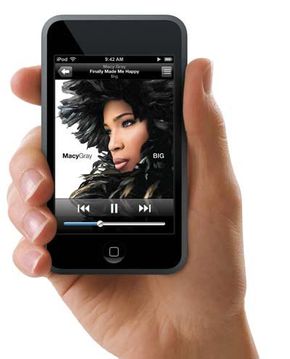
iPod touch, announced in September 2007, is a touch-screen iPod with an 8-GB or 16-GB capacity. It looks a lot like an iPhone, and it uses the iPhone's multi-touch user interface. You can learn all about the technology in How the iPhone Works.
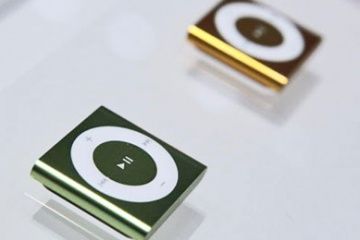
iPod shuffle, with a 1-GB capacity, plays only songs and has no display.
iPod nano plays digital audio, displays digital photos and comes in 4- and 8-GB capacities. It has a 2-inch display screen and a smaller form factor than the iPod video.
In this article, we'll be focusing on iPods with audio and video capabilities. We'll dissect a fifth-generation iPod video to find out how it works, check out what type of software is available to enhance its functionality, and find out why so many people buy iPod after iPod.
Although the iPod is an Apple product, it works with both Mac and Windows machines. Since it's the top-selling media player in the United States, probably the big question is: What makes it different from any other digital media player? The answer will differ depending on who you ask. Some might say it's the form factor -- the 80-GB iPod classic is less than half an inch (1.4 centimeters) deep and weighs about 4.9 ounces (140 grams) [source: Apple]. For comparison, the Zen Portable Media Center from Creative is 1.06 inches (2.7 centimeters) deep, weighs 12 ounces (340 grams) and has only 20 GB of hard drive space [source: Creative].
Other people might tell you it's the Apple Click Wheel, a touch-sensitive wheel that makes it incredibly easy to navigate through the various menus and options with just a thumb. According to Apple CEO Steve Jobs in a Newsweek interview, "It was developed out of necessity for the Mini, because there wasn't enough room [for the buttons]. But the minute we experienced it we just thought, 'My God, why didn't we think of this sooner?'" And then, some might tell you the greatest thing in the world is the super-tight iPod/iTunes integration (which, ironically, others will curse until the day they die).
Advertisement
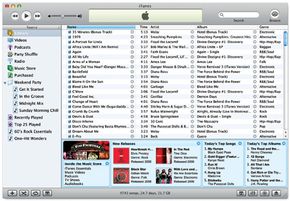
iTunes is the integrated jukebox/media-player software that comes with an iPod. It lives on your computer, and you use it for organizing, playing, converting and downloading files from an external source to your computer and from your computer to an iPod. This is really no different from the software than comes with any other portable media player. The thing that makes iTunes a brilliant invention from a consumer-electronics standpoint is the built-in iTunes Store that keeps iPod users coming back to Apple on a regular basis. Anyone who owns an iPhone or an iPod touch can also shop at the iTunes store using a WiFi connection.
The iTunes Store lets iPod users purchase music, movies, podcasts, audiobooks and music videos with a click -- it's an integral part of the iTunes software. You can watch or listen to the files through iTunes on your computer and download them to your iPod. And you don't even have to drag and drop: The iTunes software autosyncs with iPod whenever it's connected to your computer through a USB 2.0 port (you can use FireWire for charging, but not for syncing). Just plug it in, and the iPod automatically downloads every new file that you added to your iTunes jukebox since the last time it was connected. It also uploads to iTunes all new data that you added to your iPod since last the two conversed, like playlists and song ratings.
iPod Myths
If I use iPod as my digital-media player, I can only download music from the iTunes Store.Not true. You can download music from other sites (as long as the site doesn't use Windows Media DRM -- iPod isn't compatible with that encoding).
If I use iPod as my digital-media player, I can only use the iTunes software as my jukebox.Not true. While iPod is made to work with the iTunes software, there are other jukeboxes out there that you can use with your iPod.
If I download MP3 or WAV files to my iPod, they'll be converted into a proprietary audio format.Not true. Downloading files to an iPod doesn't change the format. iPod can play MP3, WAV, AAC, AIFF, Apple Lossless and Audible audio files.
Advertisement
iPod Features
The iPod touch foregoes the standard Click Wheel in favor ofmulti-touch sensing.
Photo courtesy Apple
In addition to the iTunes integration and autosync, the Click Wheel (more on this in the hardware section) and the slim form factor, some of iPod's more notable features include:
Audio The 160-GB iPod stores up to 40,000 songs (20,000 for the 80-GB model). The search function lets you type in keywords (song name, artist, album) using the Click Wheel to locate a song on the iPod hard drive. It supports MP3, WAV, AAC, AIFF, Apple Lossless and Audible audio files. You can download songs from the iTunes Store, from a different MP3 download site or rip them from your CDs into the iTunes software. You need to go through the iTunes software to download files to the iPod (unless you download a hack that lets you bypass iTunes -- more on hacks in the Software section). You can listen to audio books at various speeds -- normal, faster or slower -- without seriously distorting the sound, and connect your iPod to your home stereo through a mini-to-RCA jack. The device comes with equalizer presets for different music styles.
Video The 80-GB version holds up to 100 hours of video, and the 160-GB version holds up to 200 hours. It supports H.264 and MPEG-4 files as well as MOV files converted to iPod-friendly video through the iTunes software. You can play video podcasts, music videos, feature films and TV shows on the iPod, plus your own DVDs and home videos that you encode using QuickTime Pro and download to your player through iTunes.
Photos The player holds up to 25,000 photos. It supports files converted from JPEG, BMP, GIF, TIFF, PNG and PSD. You can download your photos to the iPod from Mac iPhoto or Windows Adobe Photoshop Elements/Album. Using an RCA or S-video connection (S-video through the dock accessory), you can connect the iPod to your home-theater TV to watch photo slideshows (complete with soundtrack) or video on a larger screen.
External hard drive The iPod can function as portable hard drive, carrying all file types between computers. Just choose "enable disk usage" in the iTunes software, and you can load whatever you want onto the player's hard disk.
Calendar/contacts syncing iPod automatically downloads all new contact/calendar data added to Mac iCal or Microsoft Outlook/Outlook Express since the last time iPod was connected to your computer.
Games iPod comes with pre-loaded games. You can also download games from the iTunes store, from third-party companies or even create your own (see the "iPod Software" section).
Car integration If you have an iPod and you're in the market for a new car or a new head unit receiver, you can get one that fully integrates your player into the sound system. There are manufacturer-built car stereos that support iPod integration to the level that you can control the device through the head-unit or steering-wheel controls.
For a full list of iPod features, see Apple: iPod. Now let's get inside a 30-GB, fifth-generation iPod video to find out what hardware it uses to accomplish these tasks.
Advertisement
Advertisement
iPod Hardware
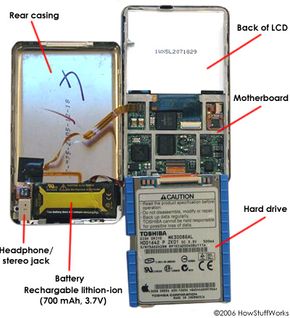
iPod hardware is easier to explain when you can see it. Take apart an iPod and look inside at these iPod hardware pictures.
HowStuffWorks.com
Before we take apart our iPod video, there are a couple of things you should know. First, the screen on this iPod is cracked. Since no one at HowStuffWorks volunteered their perfect little iPod as a subject for this author's screwdriver, we turned to eBay to find a damaged unit we could take apart with good conscience. Which brings us to the second thing you should know: iPods are almost as valuable broken as they are in mint condition.
After several last-minute outbids, we found out we had to pay about $200 for a 30-GB iPod video with a cracked LCD -- this was the typical ending price for this type of unit. And a brand-new, sixth-generation one costs $249 and has more storage space. We were left shaking our heads. Are hundreds of people writing articles that incorporate an iPod dissection? Are hundreds of people that addicted to tinkering with high-priced electronics? Are iPods really so hard to get fixed by Apple once the one-year warranty runs out? The New York Times article "Good Luck With That Broken iPod" (February 4, 2006) would suggest the latter, although it's really anybody's guess.
Advertisement
That said, let's pry this baby apart.
For most of the iPod video's functionality, we're dealing with seven primary components:
The case actually isn't that difficult to get into -- we used a 6-inch metal putty knife to pry apart the seam. Once you see that you need to get the knife under the thin edge of one side of the casing (instead of driving it straight down), it comes apart pretty quickly. When we pulled it apart we saw the back of the LCD, rear casing, motherboard, headphone/stereo jack and hard drive.
This particular iPod video uses a 30-GB Toshiba 1.8-inch hard drive (model MK3008GAL), featuring 4200 rpm and a USB interface. It weighs 1.7 ounces (48 grams) and fits 30 GB onto a single platter, squeezing in 93.5 gigabits per square inch. To fit so much into so little space, the drive uses smaller and lighter sliders (which keep the right spacing between the read/write heads and the recording surface) and a more sensitive thin-film technology on the heads and the platter. The increased sensitivity allows for a greater number of recorded bits per square inch.
When you remove the front casing, you're looking at the LCD, the motherboard and the Click Wheel. The Click Wheel is a section unto itself, and we'll deal with that technology on the next page. Let's start here with the iPod video display.
The display is a 2.5-inch, 16-bit, TFT LCD. It has a 320x240-pixel resolution and a 0.156 dot pitch. The screen is incredibly thin -- just 0.125 inches (3.175 mm) deep.
The connectors used in the iPod are miniscule. Instead of the plastic connectors you find in larger devices, the ends of the wires that connect the various components of the iPod are coated in a film that stiffens them to create a viable input.
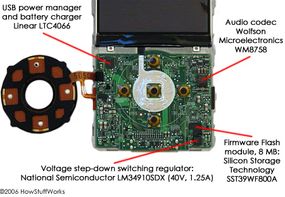
All of the chips and memory devices that make an iPod run are situated on the motherboard.
HowStuffWorks.com
A "mixed-signal array" is a chip that can deal with both analog and digital data. In the case of the Click Wheel, the controller has to accept analog data generated by the movement of a finger over the surface of the wheel and turn it into digital data the microprocessor can understand. Let's find out how it does that.
Advertisement
iPod Click Wheel
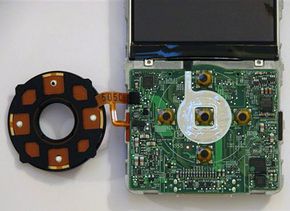
Behind the Click Wheel face (left) and Click Wheel contacts on the motherboard
HowStuffWorks.com
The Click Wheel is a touch-sensitive ring that you use to navigate through all of iPod's menus and control all of its features. It provides two ways to input commands: by sliding your finger around the wheel and by pressing buttons located under and in the middle of the wheel.
Under the plastic surface of the Click Wheel, there are four mechanical buttons (Menu, back, forward, play/pause), and there's one button in the center (select).
Advertisement
You've got five buttons and five corresponding contacts on the motherboard. When you press, say, the right side of the wheel while you're listening to a song, the wheel pushes down the forward button. The underside of each rubber button is metal, so pressing it completes the corresponding circuit on the motherboard. The motherboard tells the processor this circuit is complete, and the processor tells the operating system to fast-forward through the song.
The Click Wheel's touch-sensitive function lets you move through lists, adjust volume and fast forward through a song by moving your finger around the stationary wheel. It works a lot like a laptop touchpad. In fact, the company that supplied the Click Wheel for the 4G iPod was Synaptics, most widely known for making laptop touchpads. For the 5G, Apple created its own proprietary Click Wheel design based on the same capacitive sensing principle as the previous Synaptics-designed Click Wheel.
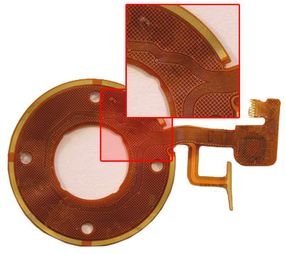
Under the plastic cover of the Click Wheel, there is a membrane embedded with metallic channels. Where the channels intersect, a positional address is created, like coordinates on a graph.
At its most basic, a capacitive-sensing system works like this: The system controller supplies an electrical current to the grid. The metal channels that form the grid are conductors -- they conduct electricity. When another conductor -- say, your finger -- gets close to the grid, the current wants to flow to your finger to complete the circuit. But there's a piece of nonconductive plastic in the way -- the Click Wheel cover. So the charge builds up at the point of the grid that's closest to your finger. This build-up of an electrical charge between two conductors is called capacitance. The closer the two conductors are without touching, the greater the capacitance.
Front of membrane: Here you can see the conductive grid
HowStuffWorks.com
The "sensing" part of the system comes in with the controller. The Click Wheel controller (see above) is programmed to measure changes in capacitance. The greater the change in capacitance at any given point, the closer your finger must be to that point. When the controller detects a certain change in capacitance, it sends a signal to the microprocessor. As you move your finger around the wheel, the charge build-up moves around the wheel with it. Every time the controller senses capacitance at a given point, it sends a signal. That's how the Click Wheel can detect speed of motion -- the faster you move your finger around the wheel, the more compacted the stream of signals it sends out. And as the microprocessor receives the signals, it performs the corresponding action -- increasing the volume, for instance. When your finger stops moving around the wheel, the controller stops detecting changes in capacitance and stops sending signals, and the microprocessor stops increasing the volume.
Now, in discussing the workings of the Click Wheel, a particularly curious HowStuffWorks staffer raised the following question: If your finger controls the Click Wheel because your finger is a conductor, why can't you control the Click Wheel with a paper clip?
While we scratched our heads, we embarked on a experiment.
Now that we've checked out the iPod hardware, let's take a look at the software it's supporting.
Experiment: How About an Apple?
What can you use to control the touch-sensitive Click Wheel? Here's an abbreviated list of what we tested:
The yesses are easily explainable -- fruit and flesh can conduct electricity. The no's, however, are a bit more mysterious. The pen cap and the Silly Putty are not conductors, end of story. But what about the tip of the soldering tool, the paper clip and the charger prongs? Those are conductors! To solve this riddle, we contacted an expert in the electronics field, who recommended the following action: Wrap your finger in aluminum foil and try to work the Scroll Wheel. Our expert was thinking "surface area." This finger-wrapped-in-foil input worked perfectly.
Can it be that the surface area of the paper clip is not enough to trigger the conductive grid? To investigate this hypothesis, we tried to work the Scroll Wheel using the blunt end of a dinner knife (approx. 0.75 in x 0.5 in). It worked. We concluded thatsurface area matters.
But there's another factor, too, because holding the dinner knife between two plastic pens and moving it around the Scroll Wheeldoesn't work. Same with the apple and the orange. You need to be touching the knife or the orange in order for the Scroll Wheel to detect it. The determining factor, then, is you -- the human body is a very big conductor, providing a very big neutral area for a charge to jump to. The charge difference between your body and the Click Wheel's electrodes provides the voltage -- or electrical "pressure" -- that activates the Click Wheel system.
Advertisement
iPod Software and Hacks
iPod video main menu
Photo courtesy Apple
While Apple is very tight-lipped about its iPod software, most reports have the iPod 5G runs on the Pixo OS 2.1 operating system along with PortalPlayer's Digital Media Platform. The PortalPlayer platform is an all-in-one "system on a chip" that provides some of the hardware we already looked at, including the two ARM7TDMI microprocessor cores. The developer package includes audio-decoder support, customizable firmware (with support for DRM-system development) and software-development tools. The iPod user-interface is reportedly based on the Pixo Toolbox software that was available when Apple was creating the device (Pixo is now part of Sun Microsystems).
In addition to the user-interface and operating-system software, the iPod's video coding and decoding happens at the software level. The Broadcom video chip we looked at in the last section handles processing at the hardware level but has a corresponding piece of software to run the video codec.
Advertisement
As far as operating-system requirements, iPod video is compatible with Mac OS X v10.3.9 or later, Windows 2000 (with Service Pack 4 or later) and Windows XP Home and Professional (with Service Pack 2 or later).
Where iPod software starts getting really interesting is in the third-party software and "hacks" that have sprung up in response to iPod's popularity. iPod third-party software consists of programs that use or build on current iPod functions without changing the way the device is supposed to work. This includes downloadable iPod games, programs that convert a bunch of DVDs to iPod-friendly video files in one shot, programs that convert PDA data and PowerPoint presentations to iPod-compatible files and software that lets you create your own text-based iPod games.
iPod hacks are programs written to give iPods new (non-Apple-intended) functionality. You know how we talked about things you can't do with an iPod, like sync via FireWire? Well, you can hack an iPod to sync via FireWire. Unless you're a programmer, "hacking an iPod" just means you download a chunk of code that alters your iPod's functionality at the software level. If you're a programmer, it means developing that code. iPod hackers are publishing all sorts of programs that alter the way an iPod works -- some of the software is free, and some of it is for purchase. Some currently available hacks let you:
Make an iPod work with Linux machines and run Linux applications
Remove volume caps (iPods sold in Europe cap the volume at 100 decibels; uncapped iPods can reach more than 115 decibels.)
Between the built-in applications and the outside iPod software, this little device offers a lot of functionality. Add in the slew of iPod accessories out there, and you start to see why some people's daily lives revolve around an iPod.
The iPod has become so ubiquitous that you'll regularly hear people refer to MP3 players as "iPods," even if they're not talking about Apple's device. An entire genre of broadcasting has evolved to take advantage of the iPod -- you can download "podcasts" to any type of MP3 player (or computer), but these home-made broadcasts originally popped up as an iPod application.
Advertisement
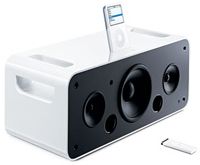
The extensive list of accessories available for the iPod, both Apple and third-party products, builds on the iPod's hardware and software to place it at the center of a "digital-media experience." From Apple, just some of the accessories you can purchase to outfit your iPod include:
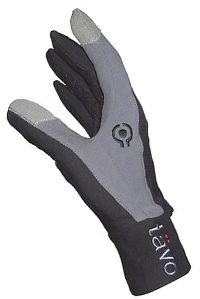
Other companies besides Apple are developing some pretty cool accessories for the iPod. Numerous car-stereo manufacturers have come out with iPod-compatible head units. Tavo has created "Click Wheel-friendly" gloves for people who use their iPods outside in cold weather. The material of the gloves' index and thumb has silver-alloy-coated nylon strands running through it to make your fingertips warm but still conductive. DesignMobel's iPod-compatible bed has an iPod dock built in and comes with an optional Bose sound system, and Atech's iLounge is a combination iPod dock, speaker system and toilet-paper dispenser. The GeekPod 100 from BatteryGeek.net is an external battery that powers an iPod up to 100 hours on a single charge. Yes, 100 hours of listening pleasure. Which brings us to a potential problem that has become an iPod controversy: People who listen to their iPod at full volume for extended periods of time may experience hearing loss.
The possibility of long-term hearing loss for people who have their earbuds in whenever they leave the house has created a nice talking point in the press. The issue is mostly about the iPod's ability to produce sound at volumes greater than 115 decibels. Some experts believe that repeated exposure to this volume, especially via in-ear headphones ("ear buds") can cause "tinnitus and loss of hearing in later life" [ref]. In Europe, Apple has capped the iPod's volume at 100 decibels in response to a French law requiring it, but units sold in the United States don't have the volume cap.
In early 2006, a man in Louisiana filed a lawsuit against Apple related to the potential for hearing loss. He claims the iPod is "inherently defective in design" and does not appropriately warn its users of the potential damage to their hearing. See BBC News: Man sues over iPod 'hearing risk' to learn more.
In view of the bad press and the lawsuit, it's possible that Apple will decide to include volume caps on all new iPods with the release of the next generation. For the time being, Apple has released a volume-cap software update for iPod video and iPod nano (see iPod Updater 2006-03-23). Regardless of whether the volume gets turned down, it looks like the spread of the iPod will continue. The release of the first iTunes cell phone in 2005 marked the start of what might turn out to be the increasing integration of iPod functionality into other portable devices. The iPod's Broadcom video processor also supports digital camera functions, so that's a possible utility to look for in future iPods. Recent Apple patents include drawings of a touch screen sporting what looks like a virtual Click Wheel, leading some to infer that the next iPod will have a graphical, entirely touch-sensitive interface.
For more information on iPods and related topics, check out the links on the next page.
Thank You
Thanks to Daniel Guzman for his assistance with this article.
Hesseldahl, Arik. "When IPod Sales Run Out Of Steam." Forbes.com. January 14, 2005. http://www.forbes.com/personaltech/2005/01/14/cx_ah_0114tentech.html
Kahney, Leander. "Doctoring an iPod to Run on Linux." Wired News. http://www.wired.com/news/mac/0,2125,57565,00.html
kernelthread.com: iPod's OS http://www.kernelthread.com/mac/oshistory/11.html
"Lawsuit: iPods may cause ... eh?" CNN.com. February 2, 2006. http://edition.cnn.com/2006/LAW/02/01/ipod.suit.ap/
Levy, Steven. "The New iPod." Newsweek. http://www.msnbc.msn.com/id/5457434/site/newsweek/
Nocera, Joe. "Good Luck With That Broken iPod." New York Times. February 4, 2006.
Quirk, Gregory A. "Find out what's really inside the iPod." CommsDesign. http://www.commsdesign.com/showArticle.jhtml?articleID=177105035
Van Buskirk, Eliot. "The secret behind the iPod's scrollwheel." MP3 Insider. September 17, 2004. http://reviews.cnet.com/4520-6450_7-5512416-1.html
Williams, Martyn. "Toshiba develops 100GB hard disk drives for notebooks." Computerworld. http://www.computerworld.com/mobiletopics/mobile/laptops/story/0,10801,92574,00.html
Cite This!
Please copy/paste the following text to properly cite this HowStuffWorks.com article: