Introduction to TV Buying Guide
![]() |
- What is the difference between HDTV and analog TV?
- Do you really need S-video inputs and front RCA jacks?
- What on earth is a digital comb filter?
- And most of all, does any of this really matter when you're sitting down to watch a movie or a ball game?
|
|
If you attack these questions piece by piece, it's really not that complicated. This guide will walk you through the basic decisions involved in TV shopping and explain the available features in plain, easy-to-understand language.
Each section will present an aspect of the decision-making process and give you a detailed description of the relevant factors. By making decisions along the way, you can whittle away at the choices until you've narrowed it down to one or two sets. Let's get started.
One Size Does Not Fit All
Often, people think bigger is better when it comes to TV screen size; but that is only true to a point. A large TV in a small room will seem awkward and may make watching TV uncomfortable. On the other hand, a TV that is too small will force you to squint to make out details and pull you out of the experience of what you are watching. Making the right decision about the size of your television is the first step in TV buying.TVs range in size from 5 inches up to 64 inches and greater. TVs are measured by their screen size. This measurement is made diagonally across the viewing area. You can use this measurement to help you decide which size is right for the space you'll be using.
![]() Photo courtesy Panasonic and Matsushita Electric Corporation of America TV size is measured diagonally across the viewing area. |
Start by mentally placing the TV in the room. Unless it's a flat-panel, a TV usually gets deeper and heavier as the screen gets larger. Make considerations for height, width and depth when placing it in the room. Make sure your location is reasonably close to a good power source.
Once you've placed the TV, measure the distance from your couch or viewing area. There is a formula to calculate the optimum screen size based on the viewing distance. Different TV sources alter the equation. The formula is simple:
| Source | |
| Cable Antenna Video tape | Multiply the number of feet between you and the screen by 4 inches. |
| DVD Satellite | Multiply the number of feet between you and the screen by 6 inches. |
| HDTV | Multiply the number of feet between you and the screen by 7 inches. |
Of course, very few of us watch only one kind of TV. Use the chart above as a guide to find an average distance and screen size that is appropriate for your needs.
If you already have an entertainment center or armoire that you don't plan to replace, then you will be limited to the TV size it can hold. Remember, when fitting a TV into a piece of furniture, you need to consider depth and weight in addition to height and width. You should also factor in a couple of inches into your measurement to allow for proper ventilation for the new set.
Flat-panel TVs are growing in popularity because you can get a larger screen with a smaller footprint, or even hang the TV on the wall, so space is less of a concern. Ventilation is still important, though, especially for plasmas, which generate a lot of heat.
![]() Photo courtesy Sony A 32-inch CRT TV is great for a simple home theater or living room set-up. |
Generally speaking, 27 inches or less is good for a bedroom or secondary television. Thirty-two inches and larger is a nice size for a family television or entertainment center.
What's Your Type?
The television is one of the most significant inventions of the 20th century. For the whole picture, read How Television Works.In the past few years, there have been tremendous leaps in TV technology. Twenty years ago, TV shoppers had very few choices. These days, several TV technologies are competing with one another. This makes TV shopping all the more difficult. Each TV type has strengths and limitations based on the technology being used. Deciding what type of TV is right for you starts with understanding the factors that affect a TV's performance.
Viewing range is an important factor, especially when shopping for a big-screen TV. The viewing angle represents the total area in front of the screen that the image can be seen without distortion. When it comes to viewing range, some TVs are better than others. This is based on the technology used to deliver the picture. For instance, because a plasma TV uses tiny lighted cells to produce the picture, if you are viewing these cells at an angle you will lose picture clarity. A traditional tube TV (CRT) uses a cathode ray to paint the screen with the picture. This method allows for a wide viewing angle.
Black level is your TV's ability to produce the color black. TVs create image color by mixing the colors red, green, and blue. Black is the absence of color and serves to provide detail to an image. Achieving a true dark black is something newer TV technologies such as LCD (liquid crystal display) and plasma are struggling to create. To this day, nothing beats an old-fashioned tube TV (CRT) for black level.
Resolution is the number of pixels per square inch. Pixels are tiny, colored dots that combine to form the picture you see on the TV screen. The more pixels there are on the screen, the higher the resolution. The higher the resolution is, the better the picture quality. Resolution measurements are shown in this type of format: 1280x720. These numbers correspond to the number of horizontal and vertical pixels in the image. To give you an idea of the available range, a CRT TV is capable of up to 480 lines of resolution, while an HDTV can produce 1920x1080. You may see resolution abbreviated to only the second (vertical) number, plus a letter "p" (progressive scan) or "i" (interlaced) -- so, 720p or 1080i.
Burn-in is the term for the damage done to a screen by static images that are displayed for a long time. Both tube TVs and plasma TVs are prone to this kind of damage. When a static image like a stock market crawler, station logo or video game score display is left on the screen for a long time, the image gets burned into the screen by the picture-producing mechanism. Burn-ins will appear as "ghost" images on a screen. The chance of burn in can be reduced on any type of TV by setting the contrast levels at their middle settings and making sure static images are not displayed on a TV for hours at a time. A new technology called auto pixel shift also helps plasma screens resist burn-in.
Glare is created when a TV screen picks up ambient light from the room and reflects it back at the viewer. This is a particular problem with tube TVs that have curved glass screens. To counter this, manufacturers provide flat-screen versions that drastically reduce glare. They are more expensive, but may be well worth the extra money if glare is a problem in your home.
Durability is a desirable trait in anything you buy. Once again, the technologies used are the greatest determining factor in the life span of your new TV. LCDs and CRT TVs are known for their long lives. On the other hand, plasma TVs and projection TVs have much shorter life spans despite their much larger price tag.
Price is an obvious factor when shopping for anything. In the world of TV shopping, price is stacked based on the size and type of television. Plasma and LCDs are more expensive than CRT TVs because the technology is newer and more expensive to produce. The most important thing to remember when TV shopping is that the highest price does not necessarily mean you are going to get the best picture.
Screen size is an interesting limitation that affects all types of TV. The limits are set based on the practicality of implementing a particular type of technology for the screen size in question. For example, a CRT tube TV gets taller and wider as the screen size increases. It also gets deeper and heavier in order to accommodate the larger tube needed to produce the picture at that size. CRTs top out at about 40 inches because any larger would make them impractical. LCDs, which are based on transistors and capacitors, suffer from a similar limitation but for a different reason -- increasing size beyond about 37 inches produces a display that is too likely to contain a bad transistor. Plasma TVs and projectors, on the other hand, really have no limit to screen size other than the price.
Direct View (CRT) TVs
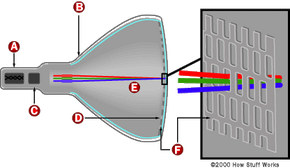
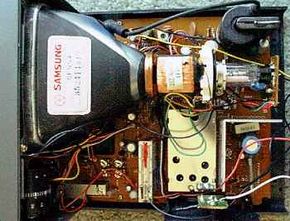
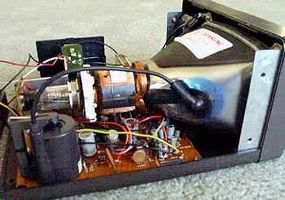
Direct view or CRT TVs are the old stand-by, tube-type sets we've all come to know and love. Because these sets use cathode-ray tubes to "paint" the image on the screen (see How Television Works), direct-view TVs have a bright, clear picture that can be viewed from any angle in the room.
![]() Photo courtesy Panasonic and Matsushita Electric Corporation of America A 13-inch CRT TV |
Pros:
- They produce great pictures with strong colors (especially dark colors).
- They can be viewed from any angle in any light.
- You can expect at least five years of serious TV watching before the picture quality starts to degrade.
- They are relatively inexpensive.
Cons:
- They are bulky and heavy.
- They are limited to about a 40-inch screen size.
- With the introduction of LCD and plasma, direct-view TV's days are numbered.
- With curved-screen direct-view TVs, larger screen size means a greater curve. So while you can get a clear view from any angle, if you're looking at a bigger curved-screen TV from the side, some stuff may be hidden on the other side of the bulge.
Flat Panel: Plasma
![]() Photo courtesy Sony Plasma display |
Plasma TVs
Plasma TVs are not TVs in the traditional sense. They are more like monitors and need an external TV tuner to display broadcast signals.
Plasma displays are digital and have higher resolutions than CRTs. When shopping for plasma TVs, it's important to note that not all plasma displays can produce the full resolution of HDTV. Some Plasma TVs are considered EDTVs (enhanced-definition TVs), with a resolution of 852x480. On the higher end, there are full-blown high-definition plasma TVs capable of a dazzling 1,920x1,080 resolution.
Pros:
- They have a large screen size.
- They have a slim profile (3 inches thick!).
- They can be wall mounted, ceiling mounted, or placed on a stand.
Cons:
- They are relatively expensive (though prices have fallen in the past few years).
- They are susceptible to burn-in (damage done to a TV screen as a result of the long display of a static image).This can be avoided by limiting the length of time that images stay on the screen, especially for the first few months of using the plasma.
- They have a poor black level (ability to render the color black, which affects picture detail).
Flat Panel: LCD
LCDs are larger versions of your laptop computer screen. Just like plasma TVs, LCDs require an external tuner to receive input. LCDs win for slim, coming in at almost an inch thinner than plasma, and they are priced about the same as plasmas of similar screen size.
![]() Photo courtesy Panasonic and Matsushita Electric Corporation of America A 13-inch LCD TV |
Pros:
- They have a slim profile (2 inches thick!).
- Their retail price is falling (still pricey, though).
- Bright and sharp images, especially for video games or connecting your PC to your home theater.
Cons:
- They have limited screen size.
- They have poor black level.
- Images might not look as realistic as on a plasma.
Rear-Projection: CRT
Rear-projection TVs (RPTVs) are great if you are considering a large-screen TV (40 inches and greater). The basic idea of RPTVs is to combine a projector and a screen into one box. The projector casts the image on the rear of the screen. You see the image when you look at the screen head-on.
![]() Photo courtesy Panasonic and Matsushita Electric Corporation of America RPTV |
CRT Rear-projection TVs
CRT rear-projection TVs use three cathode ray tubes to shoot red, green, and blue onto a projection screen. These huge beasts have long been a staple of home theaters.
![]() Photo courtesy Sony A 53-inch CRT rear-projection TV |
Pros:
- They offer the most screen size for your buck.
- They have excellent picture quality.
- They have excellent black level.
Cons:
- They are very heavy and deep.
- They cannot be viewed in bright light.
- They have a narrow viewing angle.
- They are hard to maintain.
Rear Projection: DLP
DLP (digital light processing) projectors work by manipulating thousands of tiny mirrors on a semiconductor chip. Color is generated by shining a light through a rotating color wheel that has red, green, and blue on it. The now colored beam hits the semiconductor chip to create the image used for projection.Pros:
- They have an excellent picture.
- They are capable of displaying HDTV at full resolution.
- They require no maintenance.
Cons:
- They are expensive.
- They have a limited viewing angle.
- Some people notice a "rainbow effect" in DLP systems that use a segmented color wheel.
Rear Projection: LCD
LCD big screen TVs are becoming more prevalent. LCD projection works like a slide show by directing light through a silicone chip and then magnifying it for projection.
![]() Photo courtesy Panasonic and Matsushita Electric Corporation of America A rear-projection LCD |
Pros:
- They produce an excellent picture.
- They have a slim profile.
- They are expensive.
- They have a poor black level.
Rear Projection: LCoS
LCoS is an emerging LCD technology that operates differently from other LCD displays. LCoS rear-projection TVs work by directing light through a series of polarizers (a type of light filter used to organize light waves into a single path for reflection) before being magnified and projected onto the screen.
![]() Photo courtesy Panasonic and Matsushita Electric Corporation of America An LCoS rear-projection TV has a slim profile. |
Pros:
- They produce an excellent picture.
- They have a slim profile.
Con:
- They are very expensive.
- They have a poor black level.
- Not as many companies manufacture LCoS sets, so choice is somewhat limited.
Front Projection: CRT
When you are looking for screen sizes in excess of 100 inches, it's time to consider front projection. Not a TV in the true sense of the word, front-projection TV (FPTV) works like the projector you see at your local movie theater. A separate projection device casts the image onto a dedicated screen on the adjacent wall. If you are looking for a true home theater and you have deep pockets, this is the way to go.
![]() Photo courtesy Silicon Light Machines Front projection is an excellent choice when you need a huge screen. |
Some lower-end front-projection models don't produce a bright enough picture to view it in a fully lit room, and you'll have to dim the lights to get a good view. The lumens value indicates the brightness of the projected picture; the higher the lumens number, the better.
CRT Front-Projection TVs
CRT projectors combine three cathode-ray tubes in one box to fire red, green, and blue light to create the image on the screen.
Pros:
- They have a huge screen size.
- They have great picture quality for the size.
Cons:
- They are very expensive.
- They require calibration and maintenance.
- They require custom wiring and installation.
Front Projection: DLP
DLP projectors are just like their rear-projecting brothers. DLP projectors use scads of tiny mirrors to reflect an image onto the screen.
![]() Photo courtesy Newstream A digital projector from Sharp |
Pros:
- They have good black level.
- Their price is falling (relative to the cost of other FPTV systems).
Con:
- They have poor viewing range.
Front Projection: LCD
LCD projectors are outboard versions of the projectors used in the rear-projection models. Out of the box, this design allows for larger screen size than its RPTV equivalent.Pros:
- They produce a bright picture.
- They produce strong, vibrant colors (except very dark colors).
Cons:
- They are very expensive.
- They have poor black level.
Analog vs. Digital
When considering TV types, there is a big distinction between analog and digital. In CRTs, you'll notice a big price difference between the two. A digital direct-view TV will have much greater resolution than its analog counterpart. Most digital TVs can display progressive-scan DVDs (480p) and HDTV (usually 1080i) at full resolution. Analog sets cannot.Analog TVs send a signal telling the television's electron gun how to "paint" lines on the screen. The problem is that the signal degrades in transmission, affecting the amount of fine detail in the image. Digital sets send this same information in bit streams (lines of data made up of ones and zeroes). The advantage is that these digital signals do not degrade, so the picture is much better on a digital set.
You should also consider the source. No matter how much money you spend on a TV, the picture will only be as good as the source signal it receives. For instance, a DVD will look better on a low-end television than an analog broadcast antenna signal will look on a high-end HDTV. That is because the quality of the digital signal sent to the analog set is far superior to the analog signal sent to the digital HDTV.
Sources break down like this:
| Type | |
| Analog | Good |
| Analog cable | Better |
| Digital cable, Digital satellite | Best |
The key when thinking about sources is to match the right TV with the source available to you. For more details on each, check out How Cable Television Works, How Satellite TV Works, and How Digital Television Works.
Analog signals received on an analog set will display standard-definition TV and cable with a resolution you're probably used to seeing. A digital cable signal (like DirecTV or Dish Network) can be displayed on an analog TV, but it will lose its quality in the conversion from digital to analog.
As of June 2006, all new TV sets 25 inches or larger must be DTV-ready. As of March 2007, the requirement expands to include all new TVs 13 inches or larger.
Digital signals on a digital TV (DTV) will allow you to watch digital broadcasts and progressive-scan DVDs at their full quality. In addition, you will be able to watch most hi-def broadcasts. Enhanced-definition TVs (like plasma TVs) will also benefit from a digital source, but they won't have enough resolution to do HDTV broadcasts justice.
Hi-def broadcast sources will look best when viewed on an HDTV. Here's a breakdown of source/display combinations:
| Combination | |
| Analog source to analog TV | Analog picture (good) |
| Digital Source to analog TV | Analog picture (better) |
| Digital source to digital TV | Digital picture (best) |
HDTV Ready?
The buzz word right now in TV land is HDTV (high-definition television). HDTV is a digital television capable of much higher resolution than a standard analog TV. For a complete explanation of HDTV, check out How HDTV Works.
![]() Photo courtesy Sony A flat-panel TV with a built-in HDTV tuner |
When thinking about whether now is the time to go high-definition, here are some things to consider:
| |
HDTVs come in two formats:
1080i is capable of 1920x1080 resolution (the highest currently available), but it is an interlaced format: The TV paints every other line of the image in alternating patterns, so it cannot display progressive-scan DVDs. Also, some critics claim that while still images are more brilliant at 1080i, movement doesn't read well on the screen.
720p turns out a resolution of 1280x720. While lower than 1080i, it still remains the most common HDTV format. Only the most discerning of videophiles can tell a difference in quality, and since it is a progressive-scan format (the TV paints every line of the image in order), it can be used for both standard and progressive-scan DVDs.
At this point, some primetime shows and sporting events are simulcast in hi-def. But if you're in an area that does not receive hi-def broadcasts, then this does you no good. There are more than a thousand hi-def stations on the air in the United States as of 2006. For a list, see DTV STATIONS ON THE AIR.
Because HDTV broadcasting is still fairly limited, DVD viewing is the big selling point for HDTV. If you put a progressive-scan DVD player together with an HDTV, the results are breathtaking. Most people who are buying HDTVs are doing so to reap the full benefits of their progressive-scan DVD player. It is possible to get into an HDTV for around $700, so if you're a serious movie buff, it may be time to make the switch.
Normal television will look a little better on an HDTV, but don't expect miracles. In fact, on a larger-screen HDTV, the set will actually reveal the imperfections of an analog broadcast. To learn more, read Getting the Most From Your HDTV.
| For more information on the transition to digital, visit the FCC's Web site www.dtv.gov. |
Different Aspects: 16:9 vs. 4:3
Aspect ratio relates the units of horizontal measurement on a TV screen in proportion to the vertical measurement. You'll notice when you're in the store that TV screens come in two shapes -- 4:3 for normal televisions, and 16:9 for widescreen TVs (for movies or HDTV).
![]() Photo courtesy Panasonic and Matsushita Electric Corporation of America 4:3 aspect ratio |
![]() Photo courtesy Panasonic and Matsushita Electric Corporation of America 16:9 aspect ratio |
Widescreen televisions are made to be shaped like movie screens. You've probably seen the message before a video starts that reads, "This presentation has been formatted for viewing on your television..." The formatting they are referring to is video formatting. If you've read How Video Formatting Works, then you know that formatting is the process of cutting, stretching and/or squeezing images to fit different aspect ratios. The problem with video formatting is that the image often becomes distorted or cropped at the edges when it's transferred. If the image is not cut, then it is stretched, squeezed and just generally reshaped to fit in those black bars called the letterbox.
Widescreen TVs have offered movie buffs an alternative to formatting or letterboxing that more accurately recreates the movie theater experience. For every 16 inches of width, they offer 9 inches of height -- and no cropping. With widescreen, films can be seen at home exactly as they were seen in the theater.
There are, however, two downsides. First, 16:9 TVs are noticeably more expensive than their 4:3 counterparts. Second, when you watch 4:3 broadcasts on a 16:9 aspect ratio, the TV stretches the image to fill the screen. People look shorter and fatter and, depending on the screen size, the picture may appear grainy. Sports are still primarily broadcast for viewing on conventional televisions. If you watch a game on a widescreen, your favorite power forward may suddenly look more like a linebacker. Widescreen TVs have a tendency to stretch images intended for normal TV screens.
Many TV manufactures offer different picture modes on their widescreen TVs to help solve this problem. A 4:3 setting is usually available and works by putting black bars on the sides of the screen, called picture boxing. If you don't like the bars, all manufacturers offer a mode that crops a little and stretches a little to fill the screen with out distorting the picture too much. You should experiment to see which works best for you.
Connectivity: Your TV is Not an Island
If you are buying a television as the centerpiece of your home entertainment center, you should consider the devices you intend to use with your TV. Many devices, such as VCRs and DVD players, offer multiple ways to connect to a television. Some are better than others. The location of these jacks is also something to consider. RCA or S-video jacks on the front of the TV make for easier connections to video game consoles. Use the following chart to understand connectivity.
![]() |
Satellite and digital cable subscribers -- don't leave the store without a set that has S-video inputs. S-video transmits satellite and digital cable at maximum resolution. Similarly, DVD players and game consoles will blaze when connected with component-video inputs.
Your new TV should have enough of the right kinds of jacks to support your needs. If the TV you love doesn't have all the right jacks, it's not a deal breaker. Ask your sales person to show you splitters or adapters that can help you properly connect all of your peripherals.
|
If you're looking to get an HDTV set-up, it's something you may want to consider. See HDMI.org to learn more. |
Picture Tricks: Judging Picture Quality
|
|
The most important thing about testing for picture quality is to go with what you know. If at all possible, you should take a DVD or VHS that you are familiar with to the store and watch that on all prospects. Watching store-fed demo broadcasts is no way to judge picture quality. But if a movie you've seen a million times looks great to you, then you're on the right track.
Things to watch out for are adjustments to the brightness and other controls that affect the picture. Check out your prospect's display controls. (If you can't find them, ask your salesperson to show you where they are.) Set the brightness, color and contrast to their medium settings. It may not look as good now, but if you can shade the screen from the overhead lighting you will get a better idea of how the set will look in your darkened living room.
Once you get your set home, also be sure to check screen geometry -- lower-end sets may not have been properly calibrated at the factory, resulting in distorted images. If you notice image distortion -- pictures getting cut off, circles that look squeezed, squares that look like rectangles -- you may have to have the set professionally recalibrated. Note that some high-end TVs, such as rear-projection models, let you adjust the calibration yourself.
While on the subject of picture quality, there are a couple of features that TVs of varying price ranges include that will help picture quality in any environment.
In the next sections, we will discuss those features.
Comb Filters and 3:2 Pulldown
Comb filters are used to get the most out of the resolution of DVDs and other digital sources. They help to correct detail and color loss that occurs when your TV renders the signal onto the screen by layering several versions of the image on top of one another. For a thorough explanation of comb filters, check out TV Comb Filters. The important thing to know about comb filters is that they come in three types:
| Filter | |
| Two-line comb filter | Good |
| Three-line comb filter | Better |
| 3D YC comb filter | Best |
Without a comb filter, you will only be seeing about 50 percent of a DVD's total picture quality. The thing to bear in mind is that your DVD player will only benefit from the comb filter if you hook it up to the TV using the composite video or RF connections. If your TV and DVD player support a higher quality connection type like component video or S-video, then a comb filter is unnecessary. It will still help, though, if you've used RF or composite jacks to hook up your digital cable box.
3:2 Pulldown Processing is rapidly becoming a standard in all TVs. It's a great feature that smoothes out pictures by correcting errors in frame rate.
Frame rate is the measurement used to calculate how many individual images are displayed in a second. Think of a flip book: You have several slightly different images, and as you flip through them quickly it appears as if there is a single, moving image. When you see a movie at the theater, the projector is operating like a flip book at a speed of 24 frames per second. The problem is that different formats operate at different frame rates. So when that same film you saw at the theater is transferred to a DVD, the frame rate jumps to roughly 29.8 per second. This can cause distortion in the image.
3:2 Pulldown Processing corrects the flaws that occur when film is transferred to another format. If you’re a film buff, then this is a feature to look for in your next set. For more information on 3:2 Pulldown Processing, including technical details, check out DVDFILE.com: What the Heck is 3:2 Pulldown?.
Vertical Compression and Color Temperature
Vertical compression mode is a feature on 4:3 televisions that helps to resolve some of the discrepancy between a DVD's resolution and the TV's resolution. It helps with formatting, too. This is something to look for if you're looking to get closer to a film-like look without springing for a 16:9 television.Color temperature settings are seldom-talked-about features, but they can help the picture quality. Color on television is broken into red, green and blue (RGB). All the colors you see on your television are some combination of those three colors. Color temperature affects tone.
Tone has to do with the behavior of grays in the image, which are a mixture of the whites and blacks created by the television. These whites and blacks are also mixtures of RGB. Lighter shades rely on blue, while darker ones lean on red. What grey does to a TV image is add depth and subtleties. Imagine looking at a picture of a friend where all the subtle shadows in his face have been removed. This familiar face would lose depth and detail and look strange to you. Your brain uses these colors to establish relationships within an object you are looking at.
On a TV, color temperature affects the type of grey in the overall picture. In a TV store, they are going to crank this setting up as high as possible (closer to blue) to offset the overhead lighting in a store. In your home, you'll probably want to set it to its lowest (closer to red). Play with it in the store. You're looking for a neutral grey that adds depth and detail to the picture.
Extras
| |
Picture in Picture (PIP) is a popular feature on more expensive sets that allows you to watch a second broadcast in a small window on the screen while you're watching something else. The thing to know about PIP is that you need two separate sources and two separate tuners to make it work. For instance, PIP will not work with a cable or satellite receiver. The reason is that the cable broadcasts are scrambled and sent to that receiver box, and it's the box that sends them to your TV. That box can only unscramble one signal at a time. There are ways around this, but it takes some splitters and tricky wiring. Ask your salesperson how to work with PIP based on your home set-up.
Memory Stick readers are being introduced in some models. This allows you to view slides from a digital camera on your TV. (To learn about Memory Sticks, see How Removable Storage Works.)
Surround sound is an attractive add-on for those not willing to spring for a full sound system. Virtual surround sound uses acoustic effects processors to simulate surround sound. Some newer sets are shipped with SS decoders and are loaded with a stereo pair of speakers and a subwoofer.
Combo TVs include DVD players, VCRs, and in some cases both, all in one box. A combo unit is a great solution for someone who doesn't feel like messing with a lot of cables and remotes just to watch a movie. Just about every manufacturer offers combo TVs in many different sizes. These units often cost less than buying the components separately. The only downside is that if one part of the combo breaks, you have to take the entire thing in for repair.
V-chips allow parents to lock out programs based on their rating. A V-chip is a required feature in every TV built since January 1, 2000. You've probably noticed at the beginning of shows an icon that pertains to the shows' content. V-chips read that rating and block out shows that have certain ratings set by the user. For more information on V-chips, see What does a V-chip really do and how does it work? But parental control doesn't stop at V-chips. Many manufacturers are making TVs that come loaded with lock-outs that can block certain channels and input sources.
Extended warranties have long been the last-ditch up-sell in retail sales. Most TVs come with a manufacturer's warranty that is more than fine for most people's needs. Unless you have children or pets who are likely to destroy expensive AV equipment, don't bother. If you are considering an extended warranty (they're not all bad), make sure to carefully read the terms to see if the reason you're considering getting it is covered.
Universal remotes take care of the problem of having a million remotes floating around the couch. By programming product codes into a universal remote control, you can control all the devices you use with your TV. Be aware that they work on most devices, but not all of them. The older your VCR or DVD player is, the less likely it is to work with your universal remote. Several manufacturers offer universal remotes with their TVs. If the TV you're looking at doesn't include a universal remote and you're interested in one, you can buy it separately. Once again, just make sure it will work with what you have. This information can usually be found on the package or by asking a salesperson.
For more information on buying a television, TV technology, and other electronics and home-theater components, check out the links on the next page.
Lots More Information
Related HowStuffWorks Articles
- How Television Works
- How Cable TV Works
- How Digital Television Works
- How accessDTV Works
- How Projection Television Works
- How Home Theater Works
- How Plasma Displays Work
- How LCDs Work
- How DVDs Work
- How VCRs Work
- What If I Shot My TV?
- Inside a TV Remote Control
More Great Links
- HDTV Television - An Introduction
- The AVS Forum
- WHO-TV.com: Digital Television Signal Formats
- CNET: TV Buying Guide
- Extreme Tech: HDTV Powerbrokers Convene in DC - 3/30/2004
Sources