
DVD Audio
DVD audio and DVD video are different formats. DVD audio discs and players are relatively rare right now, but they will become more common, and the difference in sound quality should be noticeable. In order to take advantage of higher-quality DVD audio discs, you will need a DVD player with a 192kHz/24-bit digital-to-analog converter (DAC). Most DVD players have only a 96kHz/24-bit digital-to-analog converter. So if you want to be able to listen to DVD audio discs, be sure to look for a DVD audio player with a 192kHz/24-bit digital-to-analog converter.
DVD audio recordings can provide far better sound quality than CDs. The chart below lists the sampling rate and accuracy for CD recordings and the maximum sampling rate and accuracy for DVD recordings. CDs can hold 74 minutes of music. DVD audio discs can hold 74 minutes of music at their highest quality level, 192kHz/24-bit audio. By lowering either the sampling rate or the accuracy, DVDs can be made to hold more music. A DVD audio disc can store up to two hours of 6-channel, better than CD quality, 96kHz/24-bit music. Lower the specifications further, and a DVD audio disc can hold almost seven hours of CD-quality audio.
Advertisement
Sampling Rate
- CD Audio = 441. kHz
- DVD Audio = 192 kHz
Samples Per Second
- CD Audio = 44,100
- DVD Audio = 192,000
Sampling Accuracy
- CD Audio = 16-bit
- DVD Audio = 24.bit
Number of Possible Output Levels
- CD Audio = 65,536
- DVD Audio = 16,777,216
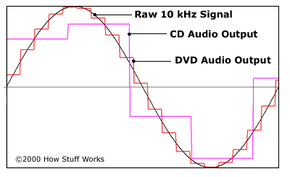
In an audio CD or DVD, each bit represents a digital command telling the DAC what voltage level to output (see How Analog and Digital Recording Works for details). While an ideal recording would follow the raw waveform exactly, digital recordings sample the sound at different frequencies, and therefore lose some of the data.
The graph above shows how the highest quality DVD audio compares to CD audio. You can see that DVD follows the signal more closely, but it's still a long way from perfect.
To get the full experience of the Dolby Digital sound used on many DVDs, you need a home theater system with five speakers, a subwoofer, and a receiver that is either "Dolby Digital ready" or has a built-in Dolby Digital decoder.
If your receiver is Dolby Digital ready, then it does not have a Dolby Digital decoder, so you need to buy a DVD player with its own Dolby Digital decoder and 5.1 channel outputs. If you also want your system to be compatible with DTS sound, then your DVD player will need a DTS decoder, too.
If your receiver has its own Dolby Digital decoder and DTS decoder, then you don't need a DVD player with 5.1 channel outputs, and you can save some money on cables by using the digital outputs.