The iTunes Store

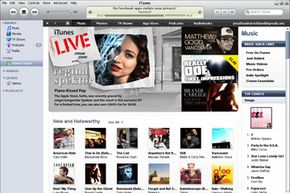
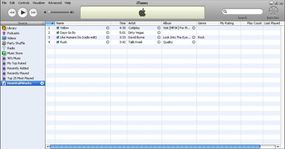
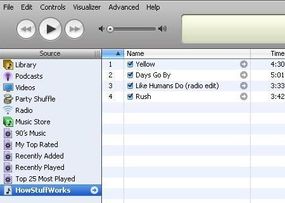
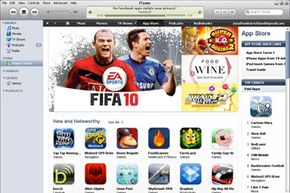
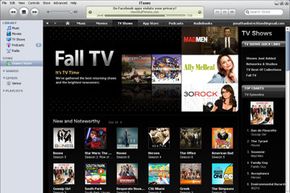
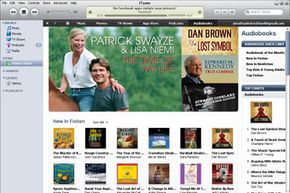
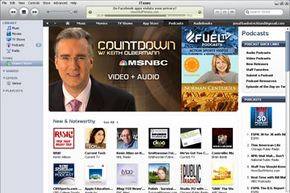
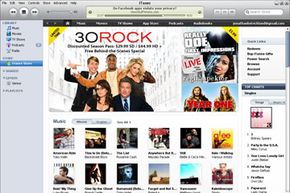
At the iTunes Store, you can find more than 3.5 million songs, 20,000 audiobooks, thousands of music videos, tens of thousands of podcasts, feature films, TV shows, iPod video games and CD album art. All you do to get to the store is click a button in the main iTunes screen. You're not going through a Web browser -- the jukebox software is the user-interface for the store.

iTunes storefront
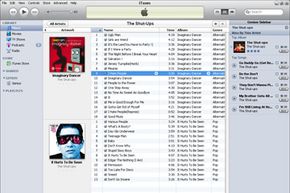
iTunes storefront

Apple has deals with record labels for iTunes-exclusive music tracks from select artists. In addition to pure content, there are community-type functions like user-published reviews, ratings and playlists, and then there is the pop-culture headshaker that is the "celebrity playlist." These are lists of songs (with a little "buy song" button next to each track) reportedly assembled by stars like Jennifer Garner, Jay-Z and Michael Moore (or their PR reps), complete with star commentary for each track. Incidentally, Elton John's "Your Song" makes Courtney Cox and David Arquette cry, and Bob Dylan's "Just Like a Woman" has made Sharon Stone feel "in touch with [her] woman-ness" since she was a young girl.

Here's a breakdown of the store content areas and what you can do there:

    Can I Put My Music on iTunes?
    Submitting your music to iTunes is not a simple task. You don't just click a button like you do with a podcast. You need to be a company, first of all; you need a UPC code for your album and an ISRC code for each track on it; and you need to be passably good -- Apple reviews the submissions and chucks the bad stuff. See CNET: How to take part in iTunes Music Store's success to learn more.
  • Music
    $0.99 per song
    Wide price range for albums
    Browse by genre (1st level), subgenre (2nd level), artist (3rd level) and album (4th level)

  • Music videos
    $1.99 each
    Browse by music genre (1st level) and artist (second level)

  • Audiobooks
    Wide price range
    Browse by category (1st level) and author (2nd level)

  • TV shows
    $1.99 each or group rate for season
    Browse by title (1st level) and season (second level)

  • Feature-length films
    $9.99 to $14.99 each
    Browse by category

  • Podcasts
    Free
    Browse by category
    Download per episode or subscribe to series
    Submit your own podcast to appear in the iTunes podcast library

  • iPod Games
    $4.99 each
    Nine games available as of September 2006

  • Movie Trailers
    Free (streaming format, not download)
    Browse by movie studio or movie genre

The Gift of iTunes
You can buy someone an iTunes Music Card (purchased at a retail store) or iTunes gift certificate (purchased through iTunes) for a certain dollar amount, or you can actually buy someone a specific piece of content. Your giftee will receive e-mail notification of the gift and instructions on how to "pick up" the file at the iTunes Store.
In addition to browsing each content area, you can also perform a search. There's a search box on the main store page where you just enter a keyword, and iTunes returns matching results from all areas of the store. You can also perform a "power search" by song, artist, album, genre and/or composer. If you enter "Adam Sandler" in the "artist" field and choose "comedy" as the genre, you'll get a list of all of Adam Sandler's songs and albums available on iTunes. If your mother has set up parental controls to limit your access to explicit content, you'll see a lot fewer results than we did.

To buy content, you need to set up an iTunes payment account (or an AOL Wallet account -- iTunes accepts those, too). To set up an iTunes account, you provide a credit card number or PayPal account that you'll use for all of your purchases. You can also pay using an iTunes Allowance (sort of like a debit account, typically set up by parents for their kids) or by Music Card or gift certificate.

When you find something you want to buy, you've got two ways to go about it: 1-Click (licensed from Amazon) or shopping cart. If you use 1-Click (which is the default setting for purchases), iTunes immediately charges your account and downloads the file to your iTunes library. If you choose to put stuff in a shopping cart, it's pretty much the same process except you buy a bunch of stuff at once instead of piece by piece. To set yourself up for shopping-cart purchases, you need to change the default setting in your iTunes software (Edit/Preferences/Store).

iTunes settings
FYI, iTunes does not accept returns.

All purchases are accomplished via an SSL (Secure Socket Layer) connection that encrypts the data. Exchanges related to browsing content and sampling songs happens in simple HTTP (hypertext transfer protocol) through a proxy server, which is a lower level server that sits between your computer and the main iTunes Web servers. This cuts down on requests sent to the main system architecture. Here's what else we know about the store's technology infrastructure:

The iTunes Music Store is composed of XML-based pages, lots of them encrypted using 128-bit AES in CBC mode. AES-CBC is a type of symmetric-key encryption. AES ("advanced encryption standard") basically takes a 128-bit block of code and reorganizes it into a 128-bit block of "ciphertext" using a particular key (an encryption algorithm). CBC mode ("cipher block chaining") is a method of disguising any encryption patterns that might reveal the key. In CBC, what happens is sort of like a double-layer encryption scheme. During the encryption process, each consecutive, 128-bit block of unencrypted text (we'll call this the "original block") is XORed with the previous, already encrypted block of ciphertext to generate a 128-bit block of text that represents the original block. The "XOR" operation is a piece of computer code that returns values based on an "exclusive OR" formula -- for example, an XOR operation might state that if the first bit in the original block OR the first bit in the ciphertext block is "1" (but only one or the other), then the resulting value is "1." This "1" is now the first bit in the new, 128-bit "representational block." It is the representational block that will be encrypted using the key. In this way, if you were encrypting a page that had two consecutive, identical 128-bit blocks of code, they would end up as completely different blocks of ciphertext.

The same key is used to encrypt and decrypt the ciphertext -- that's the "symmetric" part of the process. Once each block is decrypted using the key, the XOR operation is reversed to generate the original block of text. See Cryptographic Algorithms and RFC 3602 to learn more about AES-CBC encryption.

As we already mentioned, the iTunes Store uses a proprietary encryption method, called FairPlay, for its digital rights management scheme. When you purchase a song, the file gets encrypted as part of the download process. Next, we'll take a closer look at FairPlay and the controversy surrounding it.