Introduction to What is an HD Upconverter?
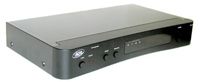
![]() Photo courtesy Amazon.com HD upconverter. See more pictures of high definition electronics. |
An upconverter allows the digital information stored on a DVD to be transmitted directly to a hi-definition TV without ever having to be converted to an analog signal. An upconverter also takes the lower screen resolution on most DVDs and "upconverts" it to the higher resolutions offered by HDTVs.
The Problem: Analog vs. Digital
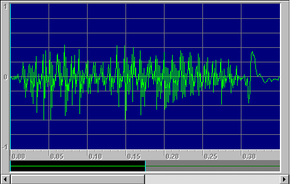
Audio and video information has been stored and transmitted in analog form since the inception of radio and television. An analog format is one in which the physical waves themselves (sound waves for audio or light waves for video) are either copied -- as grooves on a vinyl record, patterns of magnetic particles on tape or electrical signals passing through wires and cables -- or sent over the air. Here is a graph showing the analog wave created by saying the word "hello":
![]() Click here to hear the word. |
When information is stored and transmitted in digital form, the original image or sound is transformed into information computers can understand -- ones and zeroes. The exact sequence of ones and zeroes can be read by computers (or devices like CD players) in order to replicate the sound or image. That digital information can be copied an unlimited number of times, stored forever and transmitted long distances without the pattern changing or degrading, as long as the digital information isn't lost or corrupted in some way. For a more in-depth look at analog and digital technology, see How Analog and Digital Recording Works.
Today, a lot of information is in digital form, which works out well when you're storing or copying the data, but when it comes to playback, most people are using older equipment that needs an analog signal. That's why most DVD players convert the digital data on the disc to an analog electrical signal before sending it to the TV. When you're watching a DVD on an analog TV, what you're watching isn't digital; and when you're watching a DVD on a digital TV using a typical DVD player, that digital signal has been converted to analog by the player and then back to digital by the TV, which can affect picture and sound quality.
The HD-upconverter Solution
It makes sense to convert to an analog signal for an analog TV, but digital TVs are designed to handle digital information. Converting the analog signal from the DVD player back into digital data can cause errors. An upconverter allows the original, digital signal to remain digital -- it goes straight to the TV set with no conversions at all. That's the first reason to use an upconverter -- to reap the benefits of a totally digital data transfer.The second reason is a difference in resolution. Resolution is a measure of the detail in a video image. Your computer monitor measures resolution by individual pixels. Television resolution is measured in scanning lines -- horizontal lines that run across the screen. The important thing to remember is that the more scanning lines on a TV, the better the quality of the image. If you double the number of lines, you double the amount of detail you can see in the image.
Most DVDs have 480 lines of screen resolution, because they were intended for use with older TVs that only have 480 lines. An HDTV can display up to 1,080 lines, create a crisp, clear picture -- but only if the source information is HD (high-definition). Otherwise, all that extra resolution is wasted. Upconverters can help. They use microprocessors to increase the resolution to match that of an HDTV, smooth out jagged edges and clean up digital "noise" (which often shows up as grainy dots or swirls of color). The result is much closer to a high-definition viewing experience, although "true" high-definition viewing only comes from sources originally recorded and broadcast at HD resolutions.
Upconverters also have one other benefit. Some models can tell if a source was originally shot on film, like most movies and many cartoons are. The frame rate of film is different from that of a TV, so these upconverters adjust the frame rate to match that of a TV. This eliminates flickering and other problems.
Finding the Right Upconverter
|
|
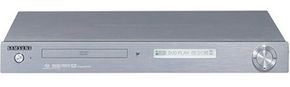
![]() Photo courtesy Amazon.com Samsung DVD-HD841 DVD player with built-in upconverter |
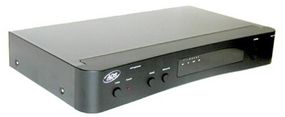
If you're not ready to upgrade your DVD player, you can purchase a consumer-grade, standalone upconverter unit for a few hundred dollars.
![]() Photo courtesy Amazon.com ADS Technologies HDUP1500 Standalone HDTV Upconverter |
There are also standalone HD-upconverter units intended for film production and mastering professionals that are used to convert their footage into a high-definition format before it is mastered onto DVD. These converters are very expensive -- they can cost in the area of $10,000 or more. Some of them are marketed as super-high-end home theater gear, even though the price point is more compatible with commercial use.
For more information on HD upconverters, HDTV and related topics, check out the links on the next page.
Lots More Information
Related HowStuffWorks Articles
- How HDTV Works
- How Digital Television Works
- How Analog and Digital Recording Works
- HowStuffWorks TV Buying Guide
- How Blu-ray Discs Work
More Great Links
- Teranex: DTV Format Conversion - A Buyer's Guide - PDF
- The Ledger: New DVD Players Accommodate HDTVs' Wide-Screen Format - 12/5/2004
- Philadelphia Inquirer: Technology: Test Drive: HDTV gadget falls short of boast - 5/20/2004
- USA Today: High-definition DVD on the way - 4/27/2003
- Teranex: Issue Faced in DTV Up-Conversion - "Making Something Out of Nothing" - Technical PDF
Sources
- Amazon.com: ADS Technologies HDUP1500 HDTV Upconverter
- The New York Times on the Web: State of the Art: For DVDs, A New Definition
- ADS Tech: HDTV UpConverter
- USA Today: High-definition DVD on the way - 4/27/2003