Shooting the Best Possible Photos

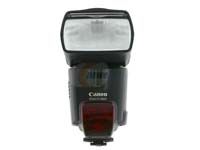
An external flash unit
Image courtesy HowStuffWorks Shopper
An external flash unit
Taking photos with a digital camera follows many of the same techniques that make for successful film photographs. However, digital cameras differ in a few important ways.

There's usually a lag between the moment you press the shutter release button and when the camera takes the picture (except for the most expensive models). A longer lag time means that it's more difficult to capture a moment. Here are a few ways to minimize this problem:

  • Set your focus ahead of time. When using auto focus, pressing the shutter release halfway tells the camera to focus in on your target. You might have to wait for a few seconds with that button halfway down, but when you finally take the picture, the camera won't have to waste time focusing.
  • Use manual exposure settings. It takes time for the camera to calculate exposure settings in full automatic mode, so set them manually whenever you can.
  • Don't use flash unless it's absolutely necessary. The time it takes to charge the flash can create additional lag. If you need a flash, consider using an external flash unit.
  • Use the viewfinder instead of the LCD screen. This will save your batteries and reduce the amount of work the camera has to do.
  • Reduce image quality. Digital cameras allow you to adjust the size and resolution of the photos you are taking. Huge, uncompressed tiff files will look great, but they might create lag. If you are trying to capture action shots, try a lower quality setting with smaller images. Obviously you're sacrificing large, high-resolution images, but it will increase your chance of getting the shot you wanted. Experiment with your camera's settings to find the right balance between image quality and shutter lag.
  • Use burst mode. If your camera offers it, burst mode is a great way to get the precise moment you're shooting for by taking a series of quick photos over the course of a few seconds. Depending on the camera, burst mode (or continuous mode) may require a compromise in image quality.
A tripod
Image courtesy HowStuffWorks Shopper
A tripod
Another problem with digital cameras is that they tend to need more light than a film camera to create a comparable exposure. As a result, slower shutter speeds are often used to get enough light. This can make it very difficult to take a photo without some blurring. The solution is simple: use a tripod. They're not very expensive, and you can mount almost all cameras to one. This step will result in a huge improvement in photo quality. If you have to take a photo with a slow shutter speed and you don't have your tripod handy, try using burst mode. It will take practice to hold the camera steady (hold it against your face and exhale as you press the button), but the burst will give you a better chance at getting one unblurred picture out of the bunch. When all else fails, a sturdy shelf or stack of books can help.

When in doubt, go for a greater depth of field. With digital images, it is always possible to use software to take certain areas of a photo out of focus, but you can never "fix" anything that's out of focus to begin with.

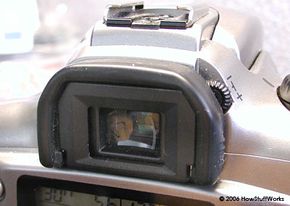
The viewfinder of a camera
The viewfinder on our camera is through-the-lens, so we shouldn't have a problem with parallax.

If your camera has a viewfinder in the upper left corner, you may have problems with parallax, especially for close-up shots. This means that the viewfinder is looking at a slightly different area than what the lens is seeing. Cameras with a through-the-lens viewfinder don't have this problem. Using the LCD screen to line up your shot can help, but the screens still don't usually show all of what the lens is seeing, and they can make it difficult to focus properly.

Image Editing Software
There are several image editing software packages available, and some cameras come with them. You can use these programs to manipulate, crop, combine and print your digital photos. There are no limits to what you can accomplish with this software, from a subtle contrast adjustment to elaborate works of art incorporating multiple images, textures and treatments. A few basic procedures will enhance digital photos and help fix problem areas:

  • Once you start editing a digital photo, save the result as a separate file. You always want to have your original image available in an unedited form.
  • Adjust contrast and color levels. Giving the contrast setting a nudge can really enhance a photograph and create a more dramatic look. If a photo looks washed out, increasing saturation levels can make the colors more vibrant. In cases where an incorrect white balance on the camera has given the image a colored tint, adjusting the color levels can bring the photo back to a realistic, untinted state.

    Before adjusting for brightness and contrast
    After adjusting for brightness and contrast
    This image was too dark after we took it. But we used Adobe Photoshop, a popular brand of photo editing software, to adjust the brightness and contrast.

  • Rotate, crop and matte photos. Photo editing software makes it simple to rotate a photo (90 degrees if you took the picture with the camera turned to the side, or smaller amounts if the horizon is just slightly out of line). You can also easily crop off unwanted portions of a photo, making it possible to recompose a shot long after you took it. Most programs allow you to add a frame around the picture, making a built-in matte.

  • Get rid of red-eye. Some programs have a "red-eye removal" function built in. You can also do it manually by selecting the subject's eyes and altering the color balance to reduce redness. More advanced users can change the entire color palette of an image, create a sepia or monochrome image, or make an image black and white.

  • Remove unwanted objects. You can use certain tools in a photo-editing program to remove parts of a photo, leaving what appears to be the plain background in its place. Say you've taken a photo of a centuries-old castle, but someone had parked a mini-van in front of it, ruining the mood of the scene. Though it will take some practice, you don't have to be a photo-editing expert to completely remove the van and leave just the castle behind it.

    Before using charcoal filter
    After using charcoal filter
    With photo editing software you can manipulate images in many different ways, like turning our motorcycle picture into a charcoal sketch.

  • Create works of art. Filters and plug-ins included with many programs allow you to change photos into artistic pieces with a few mouse clicks. Change can be drastic or subtle, such as making a photo of your back yard look like a watercolor painted by an Impressionist master, or changing a photo of your motorcycle into a charcoal sketch.

By now you should have a good idea of what to look for in a digital camera and how to use it to get the images that you want. Above all, digital photography should be a fun experience. Feel free to experiment with settings and editing software to create your own works of art.

For lots more information on digital photography, cameras and more, check out the links on the next page.